
SE XPERIA X10 mini - Introduction
Mini is the John Smith of names in mobile phones these days. All makers in the Big Five are keen to have a diminutive version of a popular handset but if there is one to be the definitive repack, it would be the Sony Ericsson XPERIA X10 mini.
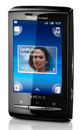
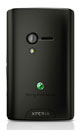
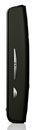
Sony Ericsson XPERIA X10 mini official shots
It took a while before mobile phones became portable not only in name. At one point, small size alone made a phone something special. Calling and texting were all there was and twelve buttons were nonnegotiable.
Those times seem prehistoric now that a contemporary smartphone is expected to do all but the dishes. There we are – 3.7” touch screens are now the norm. It sounds like pushing the limits of portability but most people won’t mind as long as there’re virtually no limits on functionality. With nearly desktop-like browsing, video and TV – displays are only supposed to get better, crisper… and bigger. Who would want it the other way? Small touchscreen doesn’t make sense.
You know, a couple of millimeters on each end are obviously enough for Nokia (N97 and N97 mini). Even the HTC HD mini isn’t that much smaller than the Touch HD. But when Sony Ericsson go mini they mean it.
The X10 mini is here to show how a mini phone should live up to its name – sheer smartphone power in a half-size package. There’re always sacrifices involved to fit the new cut but if size is what matters it’ll hardly get any better than that.
Now, everyone’s entitled to an opinion. And Sony Ericsson are keen to disagree. Small touchscreen may be against the simple logic, but just don’t rush to judgment yet. Not till you’ve seen the Sony Ericsson XPERIA X10 mini. It has more smartphone powers than most users will ever need. It’s a little sweetie, and it’s cool and gadgety too. Just don’t let the size fool you.
Sony Ericsson XPERIA X10 Mini at a glance:
· General: GSM 850/900/1800/1900 MHz, UMTS 1900/2100 MHz, HSPA
· Form factor: Touchscreen bar
· Dimensions: 83 x 50 x 16 mm, 86g weight
· Display: 2.55" 16M-color TFT capacitive touchscreen with QVGA resolution
· Platform: Android OS 1.6 with Sony Ericsson Timescape UI
· CPU: 600Mhz processor
· Memory: 128MB internal memory, microSD card slot, 2GB card included
· Camera: 5-megapixels auto-focus camera, LED flash, geotagging
· Connectivity: Wi-Fi 802.11 b/g, Bluetooth 2.1 with A2DP, standard microUSB port, GPS receiver with A-GPS, digital compass, 3.5mm audio jack
· Misc: Accelerometer for screen auto rotate, FM radio with RDS, TrackID music recgnition
· Battery: Non-removable Li-Po battery
Main disadvantages
· QVGA resolution doesn’t do Android graphics justice and limits the number of compatible apps
· Battery not user replaceable
· Limited Android homescreen functionality
· No smart dialing
· Typing long messages is very hard on the small screen
· No Bluetooth file transfers from the gallery
· No Flash support for the web browser
· Very basic camera interface
So, long story short, crowds probably won’t be flocking to the shops to replace their full-sized XPERIA X10 units for the mini version. The X10 mini doesn’t have it all and isn’t the ultimate smartphone, but all is not what everyone needs.
The X10 mini is easy on your pocket – and we don’t just mean size. The phone uses less expensive hardware – low-res screen, a midrange CPU. But if you think of it, it’s not just blatant cost-cutting.
OK, there are downgrades in most departments compared to the original XPERIA X10 but those are never too painful, especially if they’re reflected in the price.
Some might argue that the 600 MHz processor is nowhere near as impressive as a 1GHz Snapdragon but the X10 mini doesn’t seem underpowered at all – screen resolution makes quite a difference. In fact, it is the most capable handset with a QVGA screen to date and we have seen those kinds of devices perform admirably on weaker CPUs.
Of course this is all on paper and we all know a handset is more than a spec sheet can tell. We’re about to see if the Sony Ericsson XPERIA X10 mini (now that certainly is a long name for such a small phone) will cash the checks its features wrote.
It looks like they made the right choices and in the end you don’t have to pay for something you cannot use anyway. Anything higher than QVGA wouldn’t have made much difference on a 2.55” screen (which is the most you can fit in a phone this small really). Anything faster than the 600 MHz Qualcomm CPU is simply unnecessary given the low pixel count.
A so-so retail package
Nice surprises are what we like to find inside the boxes of the phones that we review, but unfortunately the X10 mini didn't have many of those. On the other hand all the essentials are covered so there is not much to whine about either.
Inside the package, there’s a microUSB cable and a charger. The rest of the contents include a short manual and a 2GB microSD card that comes loaded directly in the phone.
The headset bundled with the XPERIA X10 mini is the Sony Ericsson MH610. It has a standard 3.5mm jack - there's no sign of the Hi-Fi MH810 headset which has a custom jack developed specifically for XPERIA X10 mini.
Also included in the retail package is a rubber case that's designed to be always-on the handset. It covers and protects the sides and back of the XPERIA X10 mini. There's also a screen protector.
Since XPERIA X10 mini features exchangeable back panels, the retail package comes with a choice of two panels.
Sony Ericsson will be offering a total of six different colors for the back panel. Unfortunately, the back panel availability and retail bundling would be strictly market and even carrier-dependent. In most cases, the phone should come pre-bundled with two of the back panels and users should be able to purchase extra panels.
At 83 x 50 x 16mm the Sony Ericsson XPERIA X10 mini sure is tiny. There is hardly a pocket that won’t find enough free space for it and the mere 88 grams of weight will almost make you forget it is there.
Some might frown at the 16mm of thickness which is too much by today’s standards but it doesn’t really make the device unattractive. It almost looks like the boxy appearance was exactly what designers were looking for. Thinner than that and the phone would’ve been near impossible to handle comfortably. And the X10 mini is truly the smallest handset we have had recently.
SE XPERIA X10 mini - Design and construction
It’s all a matter of personal taste how you feel about the X10 mini. The boxy handset is quite different than most of its competitors. Manufacturers would usually go for tall slimmer bodies for their touch phones.
The plastic used on the Sony Ericsson XPERIA X10 mini won’t earn it many points either, especially against metal-built phones, but is decent. The back is nicely fingerprint-resistant with rubbery finish.
The shiny plastic on the front does become greasy with use (it doesn’t take too long) but, since the front is mostly taken by the display anyway, we are willing to let that one go.
The touchscreen itself measures 2.55” in diagonal, which seems like the very minimum that still allows finger-use. Sony Ericsson did well though to make the best use of the screen estate with the interface. We’ll get back to that later but the icons are all large enough and you won’t have trouble pressing any of them.
The screen sensitivity, as was to be expected in a capacitive unit, is excellent. The slightest of touches is enough for a click to be registered, for a great touchscreen experience.
Equally important, the QVGA resolution is adequate for this screen size but doesn’t allow for too fancy graphics. For example, most of the icon labels don’t look sharp enough and the icons themselves are not as smooth as we’ve seen on HVGA and WVGA Android handsets.
The 65K-color limitation inherent to Android versions prior to 2.0 could result in the occasional banding but it’s not as easily noticeable on a screen this size. If the X10 mini ever receives an Android 2.0 update those issues will be completely solved but we wouldn’t hold our breaths just yet.
The image quality is passable as far as TFT displays go, with good brightness and above average contrast. Anyway, an AMOLED display would’ve made sense on the full-grown XPERIA X10 but is obviously too much for the mini league.
Unfortunately the sunlight legibility of the X10 mini display is pretty mediocre. There are just too much reflections and operating the handset outdoors on a bright sunny day is pretty troublesome.
Below the display there are three hardware keys – contextual menu, home and the back button. Those are thin buttons but nicely raised and with good press feedback. The obvious absentee is the Search button: in exchange there’s a search widget on the homescreen.
Above the display we find a status LED, the earpiece and the proximity sensor. The proximity sensor is in charge of locking the display when you hold it next to your ear during calls.
The left side of the Sony Ericsson XPERIA X10 mini is completely bereft of controls. The only thing of interest here is a small groove to pull the battery cover off.
On the right you get a volume rocker and a shutter key. The volume rocker is as good as the three keys below the display but the camera key is a bit too tiny. It still has a proper stroke though and very distinct half press. It’s not bad at all, just needs some time getting used to.
On top of the handset is the screen lock key which also acts as a power button. Again, it isn’t the most comfortable to press but we suspect it was done on purpose to minimize accidental presses. More than often it needs a push with a fingernail really.
At the bottom the Sony Ericsson XPERIA X10 mini has the audio jack and the microUSB port. The audio jack is absolutely compatible with standard 3.5mm plugs but the unusual shape accommodates the X10 mini prebundled headset. There is a protective cap over the microUSB port, while the audio jack is exposed.
The back of the phone hosts the 5 megapixel camera lens and the LED flash. The loudspeaker also goes in here, slightly to the right.
Removing the battery cover reveals the microSD card slot and the SIM compartment. The microSD slot is hot-swap enabled but the bad news is the battery isn’t replaceable.
Not only is carrying a back-up battery out of the question but effectively once the original battery runs its life span you’ll have to buy a new phone. You’re more likely to upgrade long before the battery expires anyway.
At this stage we are unable to comment on the real life battery performance of the X10 mini. It’s quoted at up to 285 hours of standby and 4 hours of talk time in a 2G network. In 3G mode, it’s up to 360 hours of standby and three and half hours of talk time.
The Sony Ericsson XPERIA X10 mini is so tiny you can cup it in your hand and out of sight. It’s brilliant to handle and makes you want to cuddle it. Some users might find awkward making calls on something that small but otherwise working on such limited touchscreen estate is trouble free. There are inevitable compromises of course, like no virtual QWERTY keyboard, but the little chap sure is hard to resist.
SE XPERIA X10 mini - User interface: perfect fit
The Sony Ericsson XPERIA X10 mini runs version 1.6 of the Android platform just like the rest of the X10 gang. There is nothing out of the ordinary but what makes the mini special is the QVGA resolution which is a rare sight in the Android world.
In all fairness, Android doesn’t look as pretty on 320 x 240 pixels but this certainly isn’t a deal breaker. Sony Ericsson have done a good job of customizing the interface and making the icons large enough, given the limited screen estate.



The downsized interface isn’t much of a looker but is well touch-optimized
They have opted for more screens rather than downsizing the tiles, which, even if a bit slower, is the more comfortable option.
The XPERIA X10 mini packs the Timescape UI plug-in but lacks the Mediascape that is only reserved for its full-grown X10 for now. Timescape is an application that brings all your communications together. It always displays an aggregated view of your SMS, MMS, email, missed calls, Facebook and Twitter updates all on one screen. It also has a large number of tabs that can filter the content by type.

There’s no Mediascape this time but Timescape is here
As we already mentioned, Sony Ericsson have managed to make best use of the limited screen estate by adding large thumbable shortcuts at the four corners of the homescreen. Those lead to the message composer, music player, phonebook and dial pad/call log by default but you can easily replace them if you see fit. The tiny Android is obviously short of hardware keys but they’re not badly missed.
The homescreen has also been affected by the resize. You are limited to widgets only – no shortcuts or folders are allowed and you can only add one widget per screen.
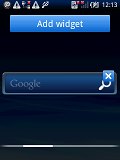
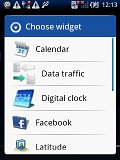
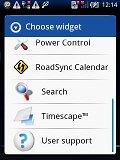
The available homescreen widgets
On the other hand, the number of available homescreen panes isn’t limited so each time you add a widget a new screen appears. You can then rearrange the screens as you please.
Luckily, the Sony Ericsson R&D have found enough space for the notification area, which we consider to be one of the best Android features. It's a thin bar at the top of the screen with status info about battery, signal strength and others such as Bluetooth or missed events. Sliding it down however reveals the whole story - you get a list of all recent notifications.
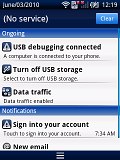
The notification area is still here
To bring up the task switcher on the X10 mini you press and hold the Home key just like on any other Android phone. It gives you access to the six most recently used apps although, due to the specific operation of the operating system, some of them might be hibernating rather than actually running in the background.
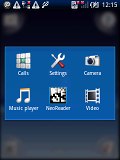
The X10 mini task switcher
Now, the actual performance is surely where the Sony Ericsson XPERIA X10 mini is nothing short of impressive. Regular HVGA resolution and a 528 MHz CPU that most other droids use surely ensures a decently smooth Android run. But when you cut the number of pixels in half and crank up the clock speed a bit, the thing starts flying.
Now we look deep into the other reviews.


No comments:
Post a Comment